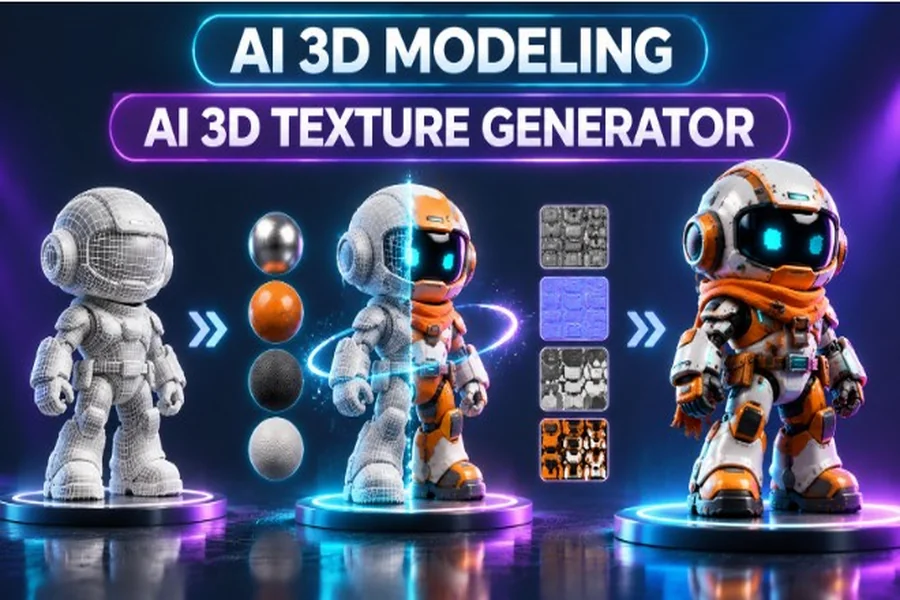
The world of 3D design is changing rapidly with the development of artificial intelligence. Tasks that once required advanced technical knowledge, expensive software, and hours of manual work are becoming more accessible through AI-powered tools. From creating digital characters to designing product prototypes, AI is helping artists, designers, developers, and beginners explore new possibilities in three-dimensional creativity.
One of the most exciting developments is AI 3D modeling, which allows users to create three-dimensional objects using images, text descriptions, and other supported inputs. Instead of building every shape manually, creators can use artificial intelligence to simplify the modeling process and develop digital assets more efficiently. Platforms such as ai 3d modeling make it easier to explore AI-powered 3D creation and transform creative concepts into digital models.
However, creating the geometry is only part of the process. A professional-looking 3D model also needs realistic colors, materials, and surface details. This is where AI texturing technology becomes important.
What Is AI 3D Modeling?
AI 3D modeling refers to the use of artificial intelligence to create or assist in creating three-dimensional digital objects. Traditional 3D modeling usually involves manually adjusting vertices, edges, faces, and surfaces to construct an object.
AI-powered modeling tools automate parts of this workflow by analyzing reference images, interpreting descriptions, and generating three-dimensional structures.
For example, a designer can provide an image of a chair, character, vehicle, or decorative object. Depending on the tool’s capabilities, the AI can analyze the reference and generate a corresponding 3D model.
This technology is useful for several creative applications:
- Creating characters and digital sculptures.
- Developing product prototypes.
- Designing game assets and environmental objects.
- Producing digital collectibles.
- Preparing models for 3D printing.
- Creating assets for animation and visualization.
AI does not necessarily eliminate the need for traditional modeling skills. Instead, it provides an additional way to accelerate initial creation and experiment with different designs.
How Does AI 3D Modeling Work?
Although different platforms use different technologies, most AI-assisted 3D modeling workflows follow a similar process.
1. Upload an Image or Provide a Description
The first step is providing the AI with information about the object you want to create.
This may involve uploading a photograph, illustration, or product image. Some platforms also support text-based descriptions that explain the object’s appearance.
For better results, use clear reference images with good lighting and a visible subject.
2. AI Analyzes the Reference
The AI system examines the supplied information to identify important visual characteristics, including shapes, proportions, contours, and object details.
This analysis helps the system understand how the object should appear in three dimensions.
3. Generate the 3D Model
After processing the reference, the AI generates a three-dimensional representation containing geometric information.
The generated model can then be inspected and, depending on the available tools, adjusted or exported for additional editing.
4. Refine the Model
AI-generated geometry may not always be perfect. Some objects may require additional adjustments to improve proportions, surface quality, or structural accuracy.
Professional designers can use compatible 3D software to refine the generated result before incorporating it into a larger project.
Why Is 3D Texturing Important?
A 3D model can have an excellent shape but still look unfinished without appropriate textures.
Texturing is the process of adding visual surface information to a 3D object. It helps determine how materials, colors, patterns, and surface details appear when the model is rendered.
For example:
- A wooden table needs a realistic wood grain pattern.
- A metal object needs an appropriate metallic appearance.
- A character needs detailed skin, clothing, and hair textures.
- A stone sculpture needs natural surface variations.
- A leather product needs a recognizable leather pattern.
Without proper texturing, many 3D models appear flat, artificial, or incomplete.
Traditional texturing can require considerable artistic effort. Artists may need to create texture maps, adjust materials, and work with UV layouts. AI-powered texturing tools aim to simplify these tasks.
What Is an AI 3D Texture Generator?
An AI 3D texture generator is a tool that uses artificial intelligence to create or apply surface appearances to three-dimensional models.
Depending on the platform, users may be able to provide text descriptions, reference images, or other supported inputs to generate suitable textures.
For example, imagine creating a 3D model of a fantasy character. The initial model may have basic geometry without realistic surface details. An AI texturing tool can help develop the appearance of its clothing, armor, skin, accessories, and other materials.
Similarly, product designers can experiment with different finishes, such as wood, plastic, metal, ceramic, and fabric.
The primary goal is to make the texturing process more accessible while reducing repetitive manual work.
Benefits of Using an AI 3D Texture Generator
AI-based texturing offers several advantages for digital creators.
Faster Texturing Workflow
Creating detailed textures manually can take significant time. AI automation can help generate surface details more efficiently, allowing artists to focus on other parts of their projects.
More Realistic Surface Appearance
Textures add depth and visual character to digital objects. AI-generated surface details can help models appear more natural and visually interesting.
Greater Creative Flexibility
Designers can experiment with different materials and appearances without recreating the entire model.
For example, the same furniture model can be explored with different wood finishes, colors, and surface patterns.
Beginner-Friendly Design Process
Traditional texturing workflows can be difficult for beginners because they involve technical concepts such as UV mapping, texture maps, and material properties.
An AI-powered interface can provide a more accessible starting point for people who are new to 3D design.
Explore Hi3D’s AI 3D Texturing Capabilities
For creators looking to simplify their 3D design workflow, Hi3D offers AI-powered tools for generating and improving digital 3D assets.
Its platform brings together different capabilities related to AI 3D creation, including image-to-3D generation and texture-related workflows.
You can explore the ai 3d texture generator to learn more about AI-assisted texturing and how it can help improve the visual appearance of 3D models.
This type of tool can be useful when you want to move beyond basic geometry and develop more detailed digital assets.
Whether you are experimenting with character designs, product concepts, or decorative objects, AI texturing can help you explore different visual styles and material appearances.
Applications of AI 3D Modeling and Texturing
The combination of AI modeling and texturing has applications across several industries.
1. Game Development
Game developers need large collections of characters, objects, props, and environmental assets. AI-assisted 3D creation can help accelerate early asset development.
Generated models may still require optimization, retopology, rigging, and additional adjustments before they are suitable for production environments.
2. Product Design
Businesses can use 3D models to visualize product concepts before manufacturing.
AI texturing makes it easier to explore different colors, finishes, and materials without manually creating every variation.
3. Animation and Digital Art
Artists can develop characters, props, and visual elements using AI-assisted modeling. Texturing adds the surface details needed to create more convincing digital scenes.
4. E-Commerce and Product Visualization
Three-dimensional product assets can support interactive product presentations and digital marketing.
Businesses can experiment with different product appearances and create visual materials for online stores.
5. 3D Printing
AI-generated models can also serve as starting points for 3D printing projects. However, visual quality alone does not guarantee printability. Models may require mesh repair, wall-thickness adjustments, and other structural checks before printing.
Tips for Getting Better Results
To achieve better results with AI 3D modeling and texturing tools, consider the following recommendations:
- Use clear reference images: High-quality images help AI understand the subject more effectively.
- Choose simple backgrounds: Unnecessary objects can make visual interpretation more difficult.
- Describe materials accurately: Use specific descriptions such as brushed metal, natural wood, glossy plastic, or soft fabric.
- Review generated geometry: Check the model for missing details and unusual structures.
- Experiment with different textures: Try multiple material styles to identify the most suitable appearance.
- Inspect the final output: Make sure the model is appropriate for its intended application.
Conclusion
Artificial intelligence is making 3D design more accessible by simplifying both modeling and texturing workflows. With AI 3D modeling, creators can transform visual references and creative ideas into three-dimensional assets with less manual effort.
However, geometry is only one part of creating a professional-looking digital object. Surface details, materials, and realistic textures are equally important for achieving an impressive final result.
An AI 3D texture generator helps simplify this process by making it easier to explore different materials and visual appearances. By combining AI-powered modeling with intelligent texturing tools, creators can develop more detailed assets for gaming, animation, product design, digital art, and 3D printing.
Platforms such as Hi3D provide an opportunity to explore these technologies and experiment with a more efficient approach to modern 3D creation.